Screen Mirroring button is missing in the new Device Hub UI

Hi,
I'm testing emteriaOS on a Raspberry Pi 5 and would like to use Device Hub for remote maintenance of devices installed at remote locations.
My environment:
Raspberry Pi 5
emteriaOS / Android 16
Device Hub
Device status is Online
Remote management service is enabled
Enable integrated VNC server is enabled
Allow reverse VNC via Device HUB is enabled
I also sent the following command successfully from Device Hub:
persist.sys.vncr.enabled = 1
According to the documentation below, there should be a Screen Mirroring button on the device detail screen:
https://emteria.com/kb/use-screen-mirroring
However, the current Device Hub UI looks different from the screenshots in the documentation, and I cannot find the Screen Mirroring button anywhere.
I can see buttons for other functions, but no Screen Mirroring option.
Could you please clarify:
Where is the Screen Mirroring function located in the current Device Hub UI?
Is Screen Mirroring available with a Free Workspace?
If a paid plan or additional remote-access option is required, which plan or option is needed?
My goal is to remotely view and operate Raspberry Pi devices installed at hotels or other remote locations via Device Hub, rather than connecting directly over the local network.
Thank you!
Comments
Hi @kanji
Unfortunately, screen mirroring is not part of the starter subscription.
The option is similarly located on the device detail panel:
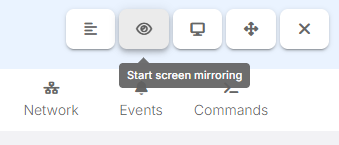
The remote-access option is required for screen mirroring.